Inggitha: A Handwritten Font That Elevates Digital Branding
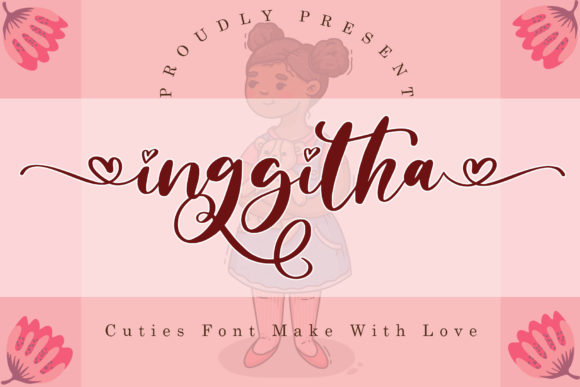
I recently had the chance to test Inggitha on a real client project—a boutique online store for a handmade candle brand. From the very first mockup, I could tell this script font was going to bring something special to the table. Inggitha is a flowing, elegant handwritten font that feels both personal and polished. It’s not overly ornate, but it carries a distinct charm that makes it stand out in digital design.
Testing Inggitha in a Hero Section
The first place I used Inggitha was in the hero section of the homepage. The client wanted a warm, inviting feel that reflected the cozy, artisanal nature of their products. I placed Inggitha as the headline over a soft background image of flickering candles. The result was stunning—clean enough for a modern layout, yet expressive enough to feel handcrafted.
One thing I noticed immediately was how well it scaled on different devices. On desktop, the font’s delicate strokes and ligatures added a touch of sophistication. On mobile, it remained legible without losing its personality. That’s not always the case with decorative fonts, so it was a pleasant surprise.
Using Inggitha for Call-to-Action Elements
Next, I tested Inggitha in a few call-to-action buttons. The font worked beautifully for short phrases like “Shop Now” and “Explore the Collection.” It gave the buttons a soft, approachable feel that aligned with the brand’s tone. However, I wouldn’t recommend it for smaller UI elements like form labels or navigation links, especially on mobile. The fine details can get lost at smaller sizes, impacting readability.
If you’re considering Inggitha for buttons or banners, make sure to pair it with a simple sans serif font for supporting text. I used Montserrat for subheadings and body copy, and the contrast worked well both visually and functionally.
Font Pairing for Digital Branding
When it comes to web design, font pairing is crucial. Inggitha is best used as a display font—ideal for headlines, hero text, and branding accents. Pairing it with a clean, readable sans serif like Open Sans or Lato ensures your layout stays user-friendly while still feeling creative.
I also tested it with a serif font, Georgia, for a more editorial feel on a blog page. The combination gave the content a warm, story-driven vibe that worked well for longer reads. If you're building a creative portfolio or a coaching website, this kind of pairing can help establish a unique visual identity.
Web Performance and Readability Considerations
From a technical standpoint, Inggitha loads quickly as a webfont. I used the WOFF2 format and saw no noticeable delay in rendering. That’s important for performance and SEO. The font includes multiple weights and alternates, which gives designers flexibility without needing to load additional typefaces.
When using Inggitha over images or dark backgrounds, I found that increasing the letter spacing slightly helped maintain clarity. Kerning adjustments were minimal, and the font displayed consistently across browsers. For accessibility, I recommend using it only for short, decorative text and ensuring sufficient contrast with background elements.
Best Uses for Inggitha in Web Design
Inggitha shines in digital spaces where a human touch is desired. Here are a few real-world applications where it performed well:
- Landing page headlines – Perfect for drawing attention and setting a warm tone.
- Logo text or brand accents – Adds personality to digital logos or brand headers.
- Hero banners on boutique stores – Enhances the emotional appeal of product pages.
- Course sales pages – Works well for titles and testimonials that need a personal touch.
- Social media graphics – Ideal for quote posts and branded images that need to feel handcrafted.
However, it’s not the best choice for long-form content or small UI text. The font’s decorative nature makes it unsuitable for body copy or technical interfaces where clarity is key.
Checking Licensing and Format Support
Before using Inggitha in a live project, I made sure to review the licensing terms. It’s important for web designers to confirm that the font includes a commercial web license, especially when designing for clients or online stores. The package I tested included webfont files and a clear license for commercial use, which is a big plus.
In terms of format support, Inggitha came with WOFF, WOFF2, and TTF files, ensuring compatibility across modern browsers. Multilingual support was also included, which is essential for international brands or websites with diverse audiences.